Showing posts with label Slide And Tap. Show all posts

Thursday, July 5, 2012

Why I Like the Microsoft Surface

Repost from Slide and Tap.
www.microsoft.com

In my previous post, I said that tablets are the bridge between mobile phones and laptops. It’s the perfect mix between mobile phone’s mobility and a laptop’s processing power. The latest tablet from Microsoft, the Surface, just made my point even clearer; You can see it from the photo above. And I have to say that I like this new Mircosoft Surface! If you want to go in to the tech specs of Surface, you can read it all here.
There are two models of Surface, one will be running Windows RT on an ARM chipset and the other will be a Windows 8 pro and Ivy bridge combo and both are Wi-Fi only if I’m not mistaken. What I’m eyeing for is the latter because what I want to experience is a full desktop work place. You see, I’ve been working in a Windows environment even before I started my professional career. There is no escaping Microsoft Windows because it has been widely adapted by corporations worldwide. Even though I own a Macbook Pro and loving the Mac OS environment, I still can’t shake the feeling that I will still need a Windows platform (maybe a gaming rig, well, for gaming purposes). It’s not really the gadget per se that is attractive to me, but it’s also the OS. The upcoming Windows 8 OS has dual interface, one in touch-screen form (like the one you see above) and the other in a normal desktop mode (with the toolbars and stuff). At first I wondered how the heck would that work but then it Microsoft demoed how it will. It’s something that is very familiar to me and something I know works (well, when I say works I meant relatively to my experience on working on a desktop environment, not the BSD or the system locks.)
What I don’t like with tablets is their apps, I doesn’t appeal to me how an app can make me productive. If you want good software that can deliver, you get desktop applications, but as of this writing I’m sure there are tons of apps out there that would slap me in the face for saying it and I’ve seen videos about such apps. Do note that I’m just a novice in the tablet environment, yapping my mouth from outside the gate. My co-bloggers here has more knowledge on apps for tablet use. Also, you can’t blame me for pointing that out because most apps I see on my friends’ tablets are games, Twitter and a browser. Maybe we’re just slow to adapt the use of a tablet to our daily lives. That is why when I saw the demo that the Surface can give me the familiar desktop environment and is able to run Adobe’s Lightroom, my eyes sparkled because I saw something I’m looking for. And to top it off, it still works as a tablet with a true tablet touch interface that is of Windows 8′s flexibility. Isn’t that a great deal?
And then there’s the keyboard. Yes, that simple addition of a keyboard makes sense. Because it’s just easier to type on a keyboard than on a screen. You have got to admit that I’m right here. Having a separate keyboard from your screen gives you more screen space because since it’s already a 7″ screen, it will get smaller when the keyboard is on. And if you type on the screen, you tend to look down to look at the screen as you type horizontally on your lap, or on a table. Try typing with the screen up and your head straight and it’s your wrist that will suffer with this setup. See my point? But even though I made a good argument with this, I will still call this based on preference because I’m sure there are lots of people who are perfectly fine with typing on a tablet (and are now hurting their necks). And besides, we have add-ons to tablets with bluetooth keyboards and stands that does make them bulky. Thing is, Microsoft included those “options” in the stock package because I think they know people need those (or maybe they just want o make their tablet worth while instead of becoming just another tablet in the market).
But it’s not all good news for me. Microsoft hasn’t announced the price yet of this device (I was waiting for the “shipping now” phrase from the keynote but no one said it) and it is rumored that the Surface with Windows 8 pro would cost the same as Apple’s Macbook Air, most likely the 11-inch models. Now what we have there is a true laptop and even though it’s bigger in width, it’s still has a thin profile and very much a portable computer with a whole lot of RAM and screen space. So… I’m back to Apple then. From Apple’s iPad to Microsoft’s Surface and now Apple’s Macbook Air. huh? But let’s see how those two will do in a comparison test, when Microsoft decides to release their Surface on the 4th quarter this year. Another thing to worry about are the availability of apps in the environment under Microsoft. Today, the best mobile environment in my opinion is that of Apple’s iOS and closely followed by Google’s Android (basically, they are the only two environments competing anyway). Microsoft has to catch up with those two giants of the mobile OS if it wants to make the Surface a hit to the consumers.
Apart from those possible drawbacks and possible options against the Surface, I still like to get my hands on one. It can do what a desktop computer can and it is smaller and more compact than those “net books”. That’s how I see Mircosoft’s Surface.
_
If you haven’t seen the ad for the Microsoft Surface, then click below. And below that, is Microsoft’s Surface keynote.



EOS 650D and its New Feature

This was my first post in Mikoy's blog Slide and Tap.

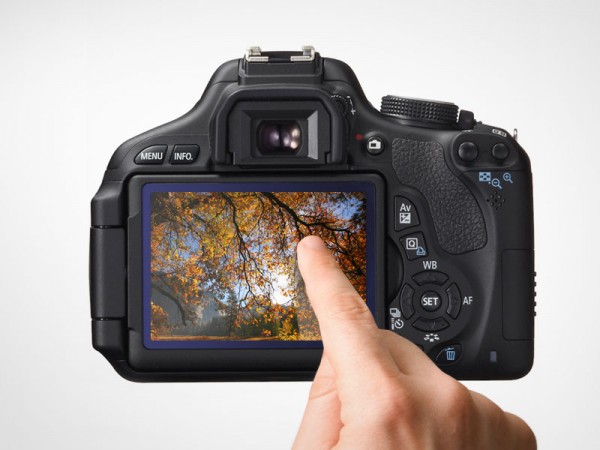
Camera technology is keeping pace with the fast advancement in technology and is also following trends of the latest gadgets. It is evident in the latest entry level DSLR from Canon, the EOS 650D/T4i DSLR. Among it's features is an 18 Megapixel Hybrid CMOS sensor witha the power of Canon’s latest DIGIC 5 processor, a burst rate of 5 frames per second (on a xxxD body) plus a swivel screen that we’ve seen from it’s bigger and older brother, the 60D. Also, as a new standard to DSLRs, this camera can also shoot video. But other than those, EOS 650D sports a technology that is bound to be applied to this level of  cameras sooner or later and that is a touch screen interface.


Touch interface is now widely adapted to a lot of gadgets, most are on mobile phones, and it’s no surprise that they would try to incorporate it to DSLRs as well. Arguably, having this in a DSLR is either a good thing or probably just a gimmick to entice new customers. For me it’s a good thing since the small body of the xxxD line of Canon cameras have limited space in the back for buttons and this just makes use of that 3-inch screen well. Of course there are still buttons for those of us who still prefer a tactile response on their cameras. Changing settings or browsing through pictures with a simple touch of finger to the screen doesn’t seem much though since we’re all used to it by now so most people wouldn’t care if they have this in their camera. Even point and shoot cameras have adapted this for quite some time now.

www.nextwavedv.com

But there is one feature with this model that surprised me, even though I expected it to happen soon anyway, and that is Touch Shutter. What it does is it allows you point at any part of the image you see on your LCD screen in Live View and the camera focuses on that part and automatically takes a picture based from your settings. It’s the the next step from the Live View feature that was introduced to DSLRs 4-5 years ago. It’s a good feature and I actually like it because it is as close to a WYSWIG type of capturing a images we can get with this camera since the 650D has 95% viewfinder frame coverage, meaning there is this 5% that you can’t see in your viewfinder that might be a difference between having a foot or not in your frame. This feature also makes it easy for you to take overhead (hail mary) shots because with the swivel screen, you can just raise your camera, tilt the screen, and see where your camera is pointing then with touch shutter, pick the subject and the camera takes a picture or taking worm's-eyeview photos without the need to drop to your belly on the ground. It also means that you don’t need to press the shutter button when taking a shot. Composing with this feature is definitely a  lot easier and I can imagine this to be very helpful to macro photography. Open Live View, turn on the touch shutter and select the focus then BOOM, you have a picture.

Since it’s a new feature, there is bound to be some things with it that needs ironing out. Kai from Digitalrev pointed (no pun intended) this out in their review of the 650D and Touch Shutter has shutter lag, something that shouldn’t exist on DSLRs. It means that it takes sometime for the camera to focus on the point you selected on the screen before it actually takes the picture, something you'll be familiar with if you've used old point and shoot cameras. Having said that, this feature won’t be useful to street photography unless you’re shooting still-stills, as seen on the video.

Canon 650D/T4i Hands-on Review by DigitalRev


But there is something more about the touch shutter that doesn’t really sit well with me even though I think that it’s a really convenient feature. Touch shutter takes away the feeling of looking at the viewfinder and pressing the shutter button while you’re face is planted on the back of your camera. I don’t know how other photographers feel about this simple gesture but it’s something I like when I use a DSLR, this is coming from a person that values the sound of a shutter in a camera. Call me old school, relative to this feature, but I like framing my images in the viewfinder and pressing the shutter button. It has a mechanical feeling to it when I take a picture from that perspective and it also feels that the camera is an extension of my body. Kai also pointed out in his video that it looks like Canon thinks of this feature as something that pro-photographers don’t really need that’s why Canon haven’t applied this to their high-end cameras. Or maybe Canon is making sure that Touch Shutter works perfectly before they add this features to the future 1Ds, 5Ds and 7Ds. Maybe it will become a standard feature and I'll get the hang of using Touch Shutter since I mentioned that it’s actually a convenient way to shoot sans the shutter lag, but there is still something inside me that prefer my face to pressed at the back of a black box with my eye on a prism in the viewfinder framing the world on small box and having to half press a button to focus then pressing it completely to capture the moment.

Quantifying the New iPad

This blog entry is also posted on Slide And Tap.

TheVerge.com
Do you remember the days when mobile computing came in 2 forms? They are mobile phones and laptops. Mobile phones became a necessity now a days since it's the main form of easy communication from long distances while on the move. The laptop didn't really catch up to mobile phones in the same way because of two reasons primarily, portability and price. On the other hand, mobile phones now are catching up to features and processing power that was once held by laptops hence our smart phones now. But now, there is a third player to mobile computing and that is tablets. It bridges the gap between mobile phones' portability and laptops' performance all in a sleek big screen (relatively to mobile phones). And when we talk about tablets, one can't help but mention the current consumer favorite, Apple's iPad.

If you haven't heard the news, for some reason I couldn't think of, Apple has updated their iPad line with the New iPad (Yes, it's not iPad 3) last March. If you want to be reminded of the features of the latest iPad, you can read Mikoy's
previous entry summarizing just that. In paper, it sounds really good and it does look good when you actually hold the device, I know because it made me want one. The new iPad was just recently released in the Philippines this month, 4 months after its release in the US and the day after it's official release, I immediately went to the nearest Apple store to see what the fuzz was all about.

The new iPad was dubbed
Resolutionary and true enough the display was marvelous for something so thin and beautiful and the fact that I can hold in my hands makes it even more enticing. That alone snapped me to wanting one! I want to read stuff from it, look at pictures, browse the web and even play games to see what this glowing screen I'm holding can do. I owned an iPod touch before so I know what it feels like to have the web in your hands, but this new iPad is really something. When I saw it, it was sitting next to a couple of iPad 2s. Too bad though that the iPad 2s don't have the same photos loaded to them like those in the new iPad because I really want to compare the difference between the two screens although looking at the icons alone shows the difference. I tried a couple of games and browsed through Flipboard as a way for me to test it but that is all I did before deciding to put back the new iPad on display because I'm really starting to see myself getting one right that moment.

I know I definitely want one right then and there but I managed to calm myself down before I start asking the sales personnel standing in front of me to give me one immediately. So I thought, why would I need this anyway? I have seen the original iPad and the Ipad 2 from my friends but I still feel reluctant to jump in the other side of the fence together with the tablet users. I won't be getting the LTE version and just opt for the wi-fi one meaning that I can't really connect to the Internet all the time. (I'm planning to get the iPhone 5 when it comes out and just share the internet connection with the iPad). Plus I don't play that many games on this platform anyway so why would I get one? Maybe the iPad will change my mind when I start playing games on it but still, not a good reason to get one. I really don't have any use for it. On the last photography workshop I attended, the speaker used an iPad to present some slides and I thought it was really convenient and it reminded me on how I felt on the day I saw the new iPad but it still didn't convinced me.

Just recently, it was pointed out that
color management is absent on iOS devices. Yet another reason why I wouldn't want an iPad. As a photographer, I want to see photos with the correct colors. Yes, most of the images on the web are set to be viewed normally by the browser but some photos are set with embedded color profiles that tells the browser how to display the colors. Not having that on the iPad is such a downer since I was thinking of using it to showcase my photos as well as hold my favorites from 500px. True, I can just set my photos to default to overcome this little problem but still.

So in the end, I left the store that day praising the device but didn't really got any convincing reasons for me to buy one. It's a product that is good to have but that's it. You can say "Just get one, if you don't like it, sell it" but that doesn't work for me and only a handful of people can convince me. I may have no compelling reason to get the new iPad but I think I might still get a tablet in the future and that is in the form of Microsoft's Surface.